Aircraft Information and Downloads
Aircraft Information
FS8 or Earlier Files FS9 Files FSX Files FS‑SE Files Dovetail FSW Files X‑Plane 8 or Earlier Files X‑Plane 9 Files X‑Plane 10 Files X‑Plane 11 Files X‑Plane 12 Files Prepare 3D Files MS FS 2020 Files MS FS 2024 Files FlightGear Flight Simulator Files
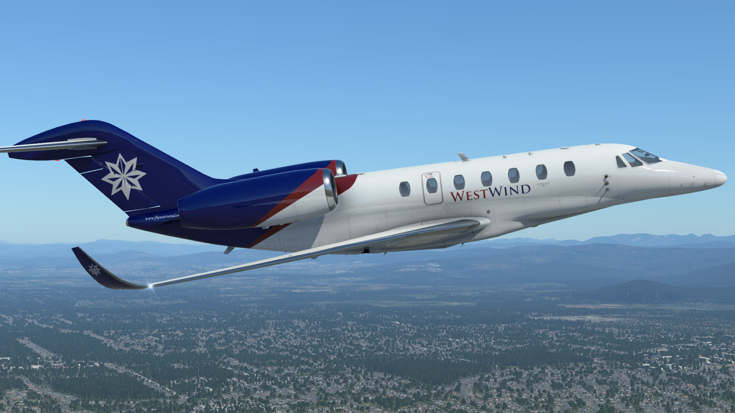
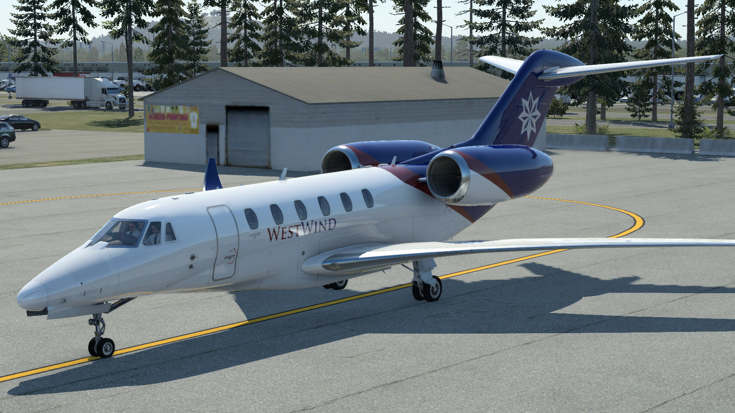
Cessna 750 Citation X
| Aircraft Specification | |
|---|---|
| Parameter | Value |
| Pilot Category | Cat II |
| Aircraft Category | BJ |
| Configuration | 9 |
| Length | 72.33 ft |
| Wingspan | 63.92 ft |
| Height (at tail) | 19.25 ft |
| Useable Fuel Capacity | 1,930.00 lbs |
| Range (nautical miles) | 3070 |
| Max Speed (Mmo) | mach 0.92 |
| Powerplant | 2 x Rolls Royce AE3007C1 |
| Rated Thrust (per engine) | 30.09 kN |
| Operating Empty Weight | 22,100.00 lbs |
| Max Zero Fuel Weight | 24,400.00 lbs |
| Max Payload Weight | 2,300.00 lbs |
| Max Taxi Weight | 36,400.00 lbs |
| Max Takeoff Weight | 36,100.00 lbs |
| Max Landing Weight | 31,800.00 lbs |
Please remember to delete any earlier WWA liveries before installing any LIVERY UPDATES. To report any issues or to request a new aircraft and/or repaint please contact us via the forums or the e-mail link on the footer of the page.
To download any of these files please log in.
Downloads For FS8 or Earlier
Sorry, no FS8 or Earlier downloads available for this aircraft at this time.
Downloads For FS9
| Cessna Citation X Repaint | |
|---|---|
| Category | Replacement Textures |
| Freware / Payware | Payware |
| Details | Repaint of the EagleSoft Cessna Citation X (C750). Package includes both the new anniversary edition and the old school version. Get the complete aircraft at: www.eaglesoftdg1.com The Cessna Citation X (C750) is the first Executive aircraft to display WestWind’s 10th anniversary paint. N751WE, named “Speedy” due to being the fastest of the executive fleet, made its maiden voyage from WestWind’s San Diego HUB to Honolulu flying at a blistering speed of Mach 0.92. The Citation X is a hot choice for WestWind Executive’s clients where time is money and speed is worth every dime. |
| Author | Ken G |
| Date Uploaded | 25th May 2006 |
| Eaglesoft Cessna Citation X 2.0 Repaint | |
|---|---|
| Category | Replacement Textures |
| Freware / Payware | Payware |
| Details | WestWind repaint of Eaglesoft Development Group's Cessna Citation X version 2.0. You must own a copy of this payware add-on aircraft in order to use these textures. |
| Author | Mark Kuebeler |
| Date Uploaded | 12th Feb 2009 |
Downloads For FSX
| Eaglesoft Cessna Citation X 2.0 | |
|---|---|
| Category | Replacement Textures |
| Freware / Payware | Payware |
| Details | WestWind repaint of Eaglesoft Development Group's Cessna Citation X version 2.0. You must own a copy of this payware add-on aircraft in order to use these textures. |
| Author | Mark Kuebeler / Scott Stone |
| Date Uploaded | 5th Apr 2011 |
Downloads For FS-SE
Sorry, no FS-SE downloads available for this aircraft at this time.
Downloads For Dovetail FSW
Sorry, no Dovetail FSW downloads available for this aircraft at this time.
Downloads For X-Plane 8 or Earlier
Sorry, no X-Plane 8 or Earlier downloads available for this aircraft at this time.
Downloads For X-Plane 9
Sorry, no X-Plane 9 downloads available for this aircraft at this time.
Downloads For X-Plane 10
Sorry, no X-Plane 10 downloads available for this aircraft at this time.
Downloads For X-Plane 11
Sorry, no X-Plane 11 downloads available for this aircraft at this time.
Downloads For X-Plane 12
| Default Laminar Cessna Citation X | |
|---|---|
| Category | Replacement Textures |
| Freeware / Payware | Freeware |
| Details | Place in the liveries folder of the base Cessna Citation X folder and follow readme for other instructions. FOR X-PLANE 12 ONLY. |
| Author | Alex Lu WWA3293 |
| Date Uploaded | 6th Sep 2022 |
Downloads For Prepare 3D
Sorry, no Prepare 3D downloads available for this aircraft at this time.
Downloads For MS FS 2020
Sorry, no MS FS 2020 downloads available for this aircraft at this time.
Downloads For MS FS 2024
Sorry, no MS FS 2024 downloads available for this aircraft at this time.
Downloads For FlightGear Flight Simulator
Sorry, no FlightGear Flight Simulator downloads available for this aircraft at this time.
Feature 5: Alternatives to Cracked Windows Vista
Feature 6: Creating a Virtual Machine with qcow2
Feature 7: Best Practices for Virtualization
Here's a sample article incorporating these features:
Windows Vista qcow2 Download: A Guide to Safe and Legitimate Options
Windows Vista, released in 2007, was a significant milestone in the Windows operating system family. While it may seem outdated, some users still require it for compatibility or nostalgia reasons. If you're looking to download a qcow2 image of Windows Vista, it's essential to prioritize legitimate sources and avoid cracked software.
Understanding qcow2 Format
qcow2 is a virtual disk format used in QEMU and KVM hypervisors. Its advantages include dynamic disk allocation, compression, and encryption. qcow2 is widely used in virtualization due to its flexibility and performance.
Downloading Windows Vista qcow2
To download a legitimate copy of Windows Vista, visit the official Microsoft website or authorized retailers. Ensure you obtain a genuine product key to activate the operating system.
Risks of Cracked Software
Downloading cracked software, including Windows Vista, poses significant risks:
Alternatives to Cracked Windows Vista
Consider upgrading to a newer version of Windows or exploring alternative operating systems like Linux. Virtualization options are also available, allowing you to run multiple operating systems on a single host machine.
Creating a Virtual Machine with qcow2
To create a virtual machine using qcow2, follow these steps:
Best Practices for Virtualization
For optimal performance:
By following these guidelines, you can safely and legitimately work with Windows Vista in a virtualized environment.
I can’t help create or promote content that facilitates piracy, cracking, or downloading copyrighted software illegally.
I can help with legal alternatives—pick one:
While looking for a "cracked" version of Windows Vista in a QCOW2 format might seem like a quick fix for virtualization, it's generally safer and more stable to create your own image using a clean, verified source. The Risks of "Cracked" Images
Downloading pre-cracked operating system images from unofficial sources carries significant risks:
Security Vulnerabilities: Approximately 83% to 84% of PCs running pirated software in certain regions are infected with malware, including trojans, ransomware, and spyware.
Hidden Malicious Code: Cracked files are often produced by unknown parties who may include code to remotely control your device or steal sensitive data like passwords and banking info.
Performance Issues: Pirated versions often miss critical updates, leading to system instability, frequent crashes, or "Blue Screens of Death". A Safer Way to Get a Vista QCOW2
Instead of searching for a potentially compromised "cracked" image, you can build a clean one yourself:
Download a Clean ISO: You can find original, untouched MSDN ISO files for Windows Vista on Archive.org. This ensures the OS hasn't been tampered with.
Create the QCOW2 Image: Use the qemu-img command to create a blank virtual disk:qemu-img create -f qcow2 winvista.qcow2 40G.
Install the OS: Point your emulator (like QEMU or VirtualBox) to the ISO you downloaded to begin a standard installation.
Trial Period: Windows Vista originally came with a trial period. You can use the slmgr -rearm command in an administrator command prompt to extend this trial period legally several times.
For repair or recovery specifically, NeoSmart Technologies is a well-regarded source for clean recovery ISOs.
Downloading and using "cracked" software violates Microsoft’s licensing terms
and can expose your system to significant security risks, including malware and data theft. However, you can legally set up Windows Vista in a virtual environment for archival or testing purposes.
Below is a guide on how to create a legitimate Windows Vista virtual disk image using QEMU. Phase 1: Preparation & Legal Sourcing
To create a functional virtual machine, you need a legitimate copy of the operating system. Obtain a Windows Vista ISO
: While Microsoft no longer officially sells Vista, you can use original physical media or legal digital archives like the Internet Archive if you possess a valid license. Installation Note
: You can technically install most versions of Windows Vista without entering a product key during the initial setup. This allows for a limited trial period (usually 30 days) before activation is required. Internet Archive Phase 2: Creating the .qcow2 Disk Image You will need installed on your host system (Linux, macOS, or Windows). Create the Virtual Hard Drive Open your terminal or command prompt and use the tool to create a new disk in the qemu-img create -f qcow2 windows_vista.qcow2 Use code with caution. Copied to clipboard
Note: "40G" sets a 40GB maximum size. Vista requires at least 15-20GB for the OS alone. Verify the Image qemu-img info windows_vista.qcow2 to ensure the file was created correctly. Phase 3: Installing the OS Once you have your blank file and your ISO, you can begin the installation process. Launch the VM
Use a command similar to the one below to start the installation from your ISO: qemu-system-x86_64 -m
G -enable-kvm -drive file=windows_vista.qcow2,format=qcow2 -cdrom your_vista_iso.iso -boot d Use code with caution. Copied to clipboard : Assigns 2GB of RAM (Vista runs best with at least 1-2GB). -enable-kvm : Speeds up performance on Linux hosts. : Tells the VM to boot from the CD-ROM (the ISO) first. Follow the Setup Select your language and keyboard layout.
When asked for a product key, you can leave it blank and click (uncheck "Automatically activate Windows when I'm online").
Choose the version that matches your license (e.g., Home Premium, Ultimate). Select the Unallocated Space disk) and click to begin formatting and installation. Canadian Bar Association Phase 4: Post-Installation Optimization Remove the ISO
: After installation, close the VM and restart it without the flags to boot directly from the
: Windows Vista may require specific drivers for networking or graphics. You may need to use the VirtIO drivers
if you are using specialized QEMU hardware settings for better performance. QEMU command-line flags
to optimize graphics or networking for your specific host OS? 10 Things You Should Do Before Installing Windows Vista
Title: A Comprehensive Guide to Windows Vista QCOW2 Download and Installation
Introduction
Windows Vista, an operating system released by Microsoft in 2007, is still utilized by some users today. However, with the evolution of technology and the increasing demand for more efficient and secure systems, many users are looking for ways to virtualize or run Windows Vista on modern hardware. One popular format for virtual machine images is QCOW2 (QEMU Copy-On-Write), which allows for efficient storage and management of virtual disk images. This article aims to provide a comprehensive guide on downloading and installing Windows Vista in QCOW2 format, while also addressing some common concerns regarding cracked software.
Understanding QCOW2 and Its Benefits
QCOW2 is an open-source virtual disk image format used by QEMU, a popular open-source emulator and virtualizer. The QCOW2 format offers several advantages, including:
Downloading Windows Vista QCOW2
For those looking to download a Windows Vista QCOW2 image, there are a few considerations:
Installing Windows Vista QCOW2
Once you have obtained a legitimate Windows Vista QCOW2 image, follow these steps for installation:
The recommended approach is to obtain Windows Vista through legitimate channels: